

Binance Link KYC SaaS — Integration Guideline
This guideline helps CAAS partners integrate Binance Link KYC SaaS from scratch. It repeats the environment and authentication detail from the Getting Started pages so that this page can be followed end to end without switching away.
Table of Contents
- Before You Begin
- Identifiers
- Onboarding Checklist
- Environment Setup
- Authentication & Request Signing
- Quick Integration Path
- Step-by-Step: Verifying a Customer
- KYC Sharing
- Request for Information
- Linked Accounts
- Webhook Notifications
- Error Handling
- Readiness Checklist
- FAQ
1. Before You Begin
What is KYC SaaS?
Binance Link KYC SaaS is a KYC-as-a-Service solution for CAAS partners. It covers collecting and validating customer information, auditing customer data, and screening for sanctions and politically exposed persons (PEPs).
It runs on the sub-accounts created in CAAS Getting Started and
has no separate account setup of its own. A sub-account cannot create an API key until its KYC has
passed, so this module gates the rest of a CAAS integration — POST /sapi/v1/broker/subAccountApi
returns -9000 KYC has not been approved for this subaccount. Until KYC completes, the sub-account
can only reduce margin and futures positions and withdraw.
System overview
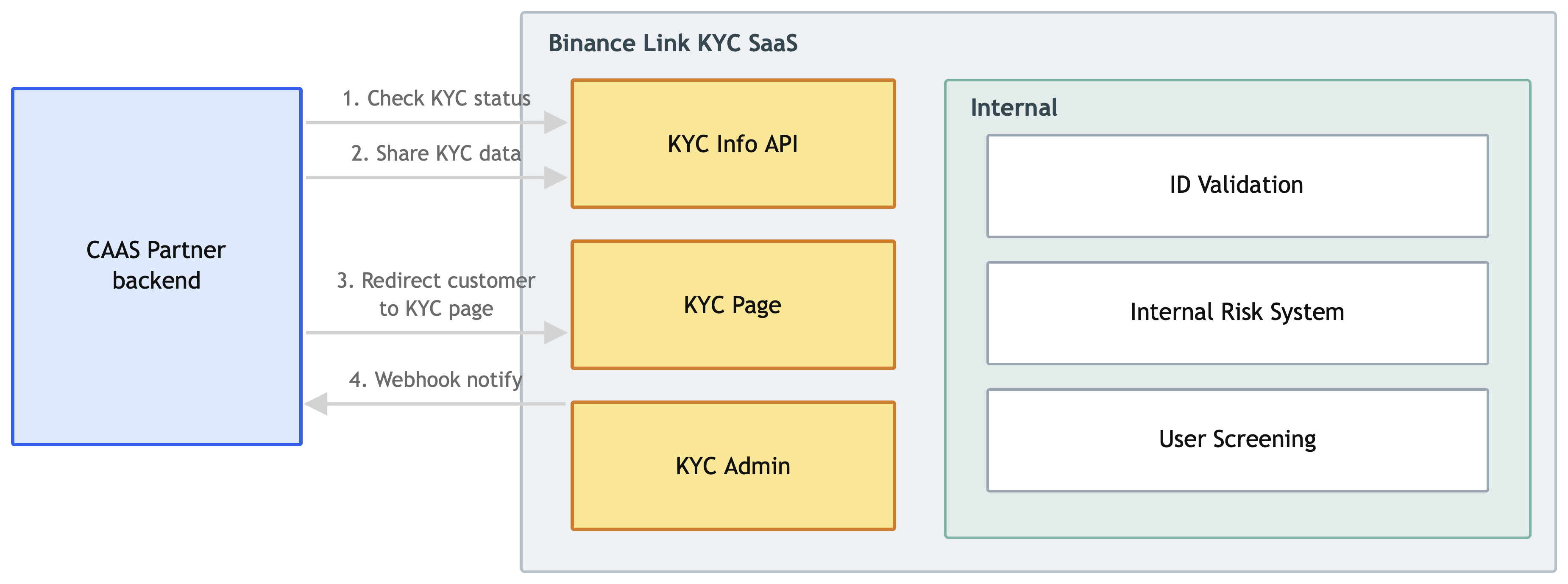
| Component | Description |
|---|---|
| CAAS partner backend | Your server. Calls the KYC APIs and receives webhook notifications. |
| KYC Info API | Retrieves KYC information and status, and accepts shared KYC data. |
| KYC Page | The web page customers are redirected to, where they enter personal information, upload an ID document, and complete a liveness check. |
| KYC Admin | Back-office system for partner employees to view and edit customer information. |
| ID Validation | Validates ID documents supplied by the customer. |
| Internal Risk System | Validates and calculates the customer risk matrix. |
| User Screening | Screens against sanctions, PEP and AML lists. |
2. Identifiers
Several identifiers are in play, issued by different parties. Mixing them up is a common source of integration errors.
| Identifier | Issued by | What it is | Where you see it |
|---|---|---|---|
bizEntityKey | Binance | Identifies your entity, not a customer. One per partner. | Every KYC SaaS request body. |
entityCustomerId | You | Your own user ID for the customer, in your system. Binance stores it to link the two sides. | Every KYC SaaS endpoint. |
kycUserId | Binance | Numeric identifier of the KYC application — not of the customer or the account. | KYC status and RFI responses; the KYC USER column in KYC Admin. |
subaccountId | Binance | The CAAS sub-account ID, returned when you create the sub-account. | CAAS /sapi/v1/broker/*; the SUB-ACCOUNTID column in KYC Admin. |
| Spot UID | Binance | The same sub-account's binance.com user ID. A different number from subaccountId. | GET /api/v3/account → uid; Markup's subUserId / subUserIds. |
| Master account UID | Binance | Your own master account's UID. Not shown in KYC Admin — read it from your account on binance.com. | Sent as brokerMainAccountId when linking accounts. |
How they relate
- One
kycUserIdmaps to oneentityCustomerId. The KYC application and your customer record are one-to-one. - One
kycUserIdcan have up to five sub-accounts linked to it. This is what Linked Accounts is for — one person completes KYC once, and several sub-accounts inherit it. entityCustomerIdis the join key. It is the only identifier present on all twelve KYC SaaS endpoints, and it is the one you choose. Pick something stable — you cannot re-key a customer later without unlinking and relinking.entityCustomerIdaccepts letters, numbers, and+,-,_and@only. Any other character is rejected, so do not pass a raw value from your own system without checking it first.subaccountIdand the spot UID are two different numbers for the same sub-account, held concurrently. Neither is derivable from the other. CAAS/sapi/v1/broker/*and KYC Admin usesubaccountId; Markup fee groups and reporting filters use the spot UID. To read the spot UID, callGET /api/v3/accountwith that sub-account's own API key and take theuidfield.
3. Onboarding Checklist
Items you provide to Binance
- Confirmation that KYC SaaS is to be enabled on your CAAS integration.
- The server IP addresses your backend will call the API from — IP allowlisting is enforced, unlike CAAS itself.
- The email addresses of the employees who need KYC Admin dashboard access, and the static IP addresses they will reach it from. Both are allowlisted.
- Your KYC status notification URL, if you want webhook notifications.
Items Binance provides to you
- Your
bizEntityKey. - Your secret key, used to sign requests.
- Access to the KYC Admin dashboard. Once allowlisting is complete, each email address receives an invitation; sign-in is through Okta and requires 2FA.
4. Environment Setup
Base URL
| Environment | URL |
|---|---|
| Production | https://cb.link-kycapi.com |
There is no separate KYC SaaS test environment — see section 13.
Request rules
- All request parameters are passed in the request body, as a JSON object or array.
- All endpoints are
POST. - All endpoints return either a JSON object or array.
- All endpoints require a valid
X-SHA2-Signatureheader. - All endpoints must be called from allowlisted IP addresses, otherwise you receive HTTP
403.
KYC SaaS does not use the main Binance signing scheme. It is a different base endpoint, a
different signature algorithm, and a different header. Nothing from
CAAS API basics applies here — no X-MBX-APIKEY, no
signature query parameter, no timestamp or recvWindow.
5. Authentication & Request Signing
- Send the KYC data in the request body as JSON.
- Convert the request body to a JSON string.
- Sign that string with HmacSHA256 using your secret key.
- Put the result in the
X-SHA2-Signaturerequest header. - Send the same JSON string you signed as the request body.
Sign the exact string you send. Serialize the JSON compactly, with no extra whitespace, and send that same string as the body. Re-serializing or reformatting after signing invalidates the signature.
Worked examples in NodeJS, Java and Python are on API request signing.
6. Quick Integration Path
- Confirm your
bizEntityKeyand secret, and that your IPs are allowlisted. - Sign and send one
Check KYC Statuscall, and confirm you get a response rather than a403. - Decide your route for each customer — KYC Sharing if you already hold verified KYC data, otherwise redirect them to the KYC page.
- Implement webhook notification handling and verify the signature.
- Implement status polling as a fallback for missed webhooks.
- Handle Request for Information responses.
- Confirm a passed customer unblocks CAAS API key creation for that sub-account.
7. Step-by-Step: Verifying a Customer
Step 1 — Check the customer's KYC status
POST /bapi/ekyc/v2/public/ekyc/customer/check-kyc-status
Requirement to proceed in CAAS: data.levelInfo.currentLevel.kycStatus = PASS.
You can also query by identifier:
| Endpoint | Looks up by |
|---|---|
POST /bapi/ekyc/v2/public/ekyc/customer/query-kyc-info | entityCustomerId |
POST /bapi/ekyc/v2/public/ekyc/customer/inner-query-kyc-status | Broker sub-account ID |
Step 2 — Get the customer verified
Two routes, depending on whether you already hold verified KYC data for that customer:
- You already hold it — submit it with KYC Sharing. No customer interaction, and it is the route this guide documents end to end.
- You do not — the customer completes KYC on a Binance-hosted page, where they enter their details, upload an ID document and complete a liveness check.
KYC Sharing is the integration path covered here. If you need customers to complete KYC on the Binance-hosted page instead, ask your account manager or the Link team — how that page is obtained is arranged at onboarding and is not part of this API surface.
Step 3 — Receive the result
The result arrives by webhook if you supplied a notifyUrl. Poll the
status endpoints from step 1 as a fallback — webhooks can be missed.
Step 4 — Act on the outcome
| Outcome | What to do |
|---|---|
| Passed | Proceed with CAAS API key creation for that sub-account. |
| More information asked | Handle the RFI flow. |
| Rejected | POST /bapi/ekyc/v2/public/ekyc/customer/refused-kyc-data records a refusal. |
8. KYC Sharing
If you already hold verified KYC data for a customer, you can share it rather than sending them through the KYC page.
| Endpoint | Purpose |
|---|---|
POST /bapi/ekyc/v2/public/ekyc/customer/share-kyc-data | Submit the customer's KYC data. |
POST /bapi/ekyc/v2/public/ekyc/customer/query-share-data-status | Check the status of a sharing request. |
Sharing is still subject to validation, risk and screening — a share request is not an automatic pass.
9. Request for Information
If the reviewers need more from the customer, the case moves to an RFI state.
| Endpoint | Purpose |
|---|---|
POST /bapi/ekyc/v2/public/ekyc/customer/page-query-rfi-records | List RFI records. |
POST /bapi/ekyc/v2/public/ekyc/customer/submit-rfi-record | Submit a response to an RFI. |
POST /bapi/ekyc/v2/public/ekyc/customer/query-submit-rfi-result | Check the result of your submission. |
10. Linked Accounts
| Endpoint | Purpose |
|---|---|
POST /bapi/ekyc/v2/public/ekyc/customer/add-account-info-list | Link multiple accounts to one verified customer. |
POST /bapi/ekyc/v2/public/ekyc/customer/query-linked-accounts | Query which accounts are linked. |
POST /bapi/ekyc/v2/public/ekyc/customer/unlink-kyc-data | Unlink a customer's shared KYC data. |
11. Webhook Notifications
Supply a notifyUrl when calling the KYC endpoints and Binance will call it when the customer's KYC
state changes.
Verify the signature on every notification before acting on it — the full request format, response requirements and verification examples are on Webhook.
Treat webhooks as a fast path, not a guarantee. Poll the status endpoints as a fallback.
notifyUrl cannot be changed once submitted. The value is fixed against the kycUserId at
submission, and there is currently no way to modify it — not even if the KYC is rejected and
resubmitted. Get it right the first time.
Point it at a stable endpoint you control rather than anything environment-specific or short-lived.
If you have no endpoint yet, notifyUrl is mandatory but accepts "." as a placeholder — see
Webhook.
12. Error Handling
Errors are returned in the response body. The full list is on Error code.
| Status | Meaning |
|---|---|
403 | The calling IP is not allowlisted. This is the most common first-integration failure. |
4XX | Malformed request; the issue is on the sender's side. |
5XX | Internal error. Query the resulting state before retrying. |
A signature mismatch is usually caused by re-serializing the JSON after signing — see section 5.
13. Readiness Checklist
KYC SaaS has no separate test environment — you verify against production. Work through this with a small number of real customers before onboarding at volume.
Authentication
- A signed
Check KYC Statuscall succeeds. - Calling from a non-allowlisted IP returns
403, confirming the allowlist is active. - A deliberately reformatted body is rejected, confirming you sign what you send.
Verification flow
- A customer completes KYC and reaches
PASS. - That customer's CAAS sub-account can then create an API key.
- A KYC Sharing submission is accepted and its status queryable.
Webhooks and recovery
- Webhook received and its signature verified.
- Webhook signature verification rejects a tampered payload.
- Status polling reconciles a customer whose webhook was missed.
RFI
- An RFI record is listed, answered, and its submission result queried.
14. FAQ
KYC SaaS questions are answered on the CAAS FAQ — including bizEntityKey,
entityCustomerId, the KYC status notification URL, the language field, and data sharing.